Reports

Generating reports

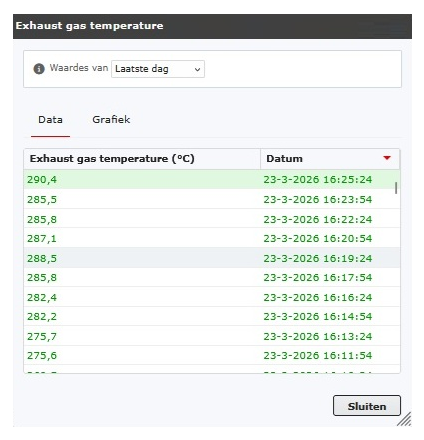
Reports can be created easily. All data collected from a machine can be downloaded from the system. You can also create reports yourself by following these steps:

  1. Select a machine
    Choose the specific machine whose data you want to analyze.
  2. Select data points
    Choose the relevant data points, such as temperature, pressure, power output, and more.
  3. Define the time period
    Set the desired time range for the report.
  4. Generate the report
    After entering the above parameters, the report will be compiled automatically.

Export options

The generated reports can be exported in various file formats, depending on your needs:

  • Excel (.xlsx)
    Useful for further data analysis and creating charts.
  • Word (.docx)
    Suitable for reports that include explanations and descriptions.
  • CSV (.csv)
    Ideal for importing into other systems or databases.
  • PDF (.pdf)
    Perfect for sharing non-editable reports.

Effective use of the reporting module

  • Standard reports
    Use the available templates for quick and efficient reporting.
  • Custom reports
    Create reports specifically tailored to your analysis requirements.
  • Automation
    Set up scheduled reports that are automatically generated and sent.

If you have any questions about the capabilities of the reporting module or about exporting data, please let us know.

Companies we've helped

News

AI

Use of AI at 101 Solutions

Within 101 Solutions, extensive research has recently been conducted into the use of artificial intelligence (AI). An important part of this is the application of predictive maintenance: predicting upcoming maintenance activities in order to prevent unplanned machine downtime.

Read more

ISO 27001 101solutions scaled

ISO 27001 – Information Security

101 Solutions has proudly achieved ISO 27001 certification, the globally recognized standard for information security. This certification confirms that we meet the highest international standards for protecting confidential data and managing risks.

Read more

DEIF

Remote access DEIF controller via DEIF Utility Software

With the remote monitoring system, it is not only possible to monitor your DEIF controller 24 hours a day, but you can also directly access the DEIF controller via the DEIF utility software. An advantage of our solution is that no IT knowledge is required to establish remote access. For example, you do not need to set up an IP address or a COM port.

Read more