VPN connection

Establish a VPN connection to your machines

Establishing a VPN connection to your machine has never been easier. In just a few steps, you can have a working connection.

Step 1: The router functionality required to create a VPN connection is built into the DCB 4.0. This means you don’t need to purchase or connect any additional hardware. The router function can also be activated remotely.

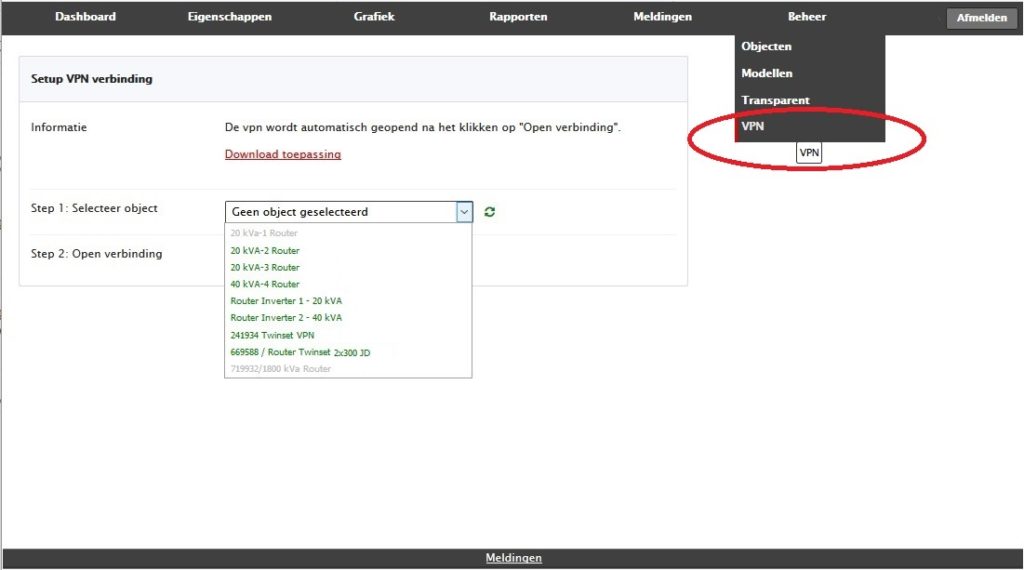
Step 2: Downloading and installing the Setup VPN application is a one-time action. See “Download application” in the screenshot below.

Step 3: In the 101Connect web portal, select the machine you want to connect to. An overview of controllers and other devices connected to the network will be displayed. Select the machine you want to access. The connection will be established (machines with their name highlighted in green currently have an active connection).

vpn scherm 4
VPN

Worry-free service

You don’t need to worry about things like WAN settings, IP addresses, configuring Modbus address registers, choosing SIM cards, or other technical details.

We deliver a fully working system that you only need to connect.

With our modular solution, you can monitor your installations 24/7, along with the ability to create a secure remote connection to your controllers, PLCs, and other equipment.

We stand out from other providers by configuring the hardware for you in a plug & play setup, making it easy to connect. Additionally, the web portal is tailored to your specifications.

Companies we've helped

News

AI

Use of AI at 101 Solutions

Within 101 Solutions, extensive research has recently been conducted into the use of artificial intelligence (AI). An important part of this is the application of predictive maintenance: predicting upcoming maintenance activities in order to prevent unplanned machine downtime.

Read more

ISO 27001 101solutions scaled

ISO 27001 – Information Security

101 Solutions has proudly achieved ISO 27001 certification, the globally recognized standard for information security. This certification confirms that we meet the highest international standards for protecting confidential data and managing risks.

Read more

DEIF

Remote access DEIF controller via DEIF Utility Software

With the remote monitoring system, it is not only possible to monitor your DEIF controller 24 hours a day, but you can also directly access the DEIF controller via the DEIF utility software. An advantage of our solution is that no IT knowledge is required to establish remote access. For example, you do not need to set up an IP address or a COM port.

Read more